A Guide to Instagram Download Photo Methods

May 8, 2026
Ever found yourself wanting to save an Instagram photo? It’s a common need, whether you’re trying to keep a precious personal memory safe or gathering content for a big marketing campaign. The good news is, you don’t need to install any complicated software. The easiest way is often using a free web tool where you just pop in the photo’s URL to get a high-quality copy saved right to your device.
Why Bother Downloading an Instagram Photo?
Before jumping into the how, it helps to understand the why. For anyone running a professional account, knowing the ins and outs of the platform is key. If that’s you, checking out a comprehensive guide to Instagram for small businesses can give you some great strategic context.
Knowing your reason for downloading helps you pick the best approach. The motivations are just as varied as the millions of images you see on your feed.
Common Reasons People Save Photos
For most of us, it’s all about preservation. Maybe a friend posted a perfect shot from a recent get-together, or you stumbled upon a travel photo that sparked some serious wanderlust. Saving an offline copy means it’s yours for good, safe from deleted accounts or privacy setting changes. With over 95 million posts uploaded every single day, trying to find that one specific image again later can feel like searching for a needle in a haystack.
On the professional side, social media managers are constantly on the lookout for great user-generated content (UGC). They need to download high-quality customer photos to feature in marketing campaigns. Creators also download their own work to build a portfolio or to find fresh ways to repurpose social media content.
When you have a local copy of an Instagram photo, you’re in control. You can set it as your phone wallpaper, use it in a personal project, or just know it’s accessible forever, no matter what happens on the platform.
These everyday situations show just how practical it is to have a reliable way to save photos. Whether it’s for a personal keepsake or a professional project, having that permanent copy makes all the difference.
Using a Web-Based Tool to Download Instagram Photos
When you just need to quickly save a photo from Instagram, web-based tools are your best friend. There’s no software to install or sketchy browser extensions to worry about. The whole process is basically just a simple copy and paste, keeping your device clean and your login info safe.
First things first, you need to grab the link for the photo you want. Open up the post on Instagram and look for the little paper airplane icon (the share button). Give that a tap, and you’ll see an option to Copy Link. This saves the post’s unique URL right to your clipboard.
Finding and Using a Web Downloader
With the link copied, pop open a new browser tab and find a web downloader. You’ll find tons of them with a quick search, but the good ones are free, don’t ask you to sign up, and work on anything from your phone to your desktop. For a no-fuss option, our own Instagram photo downloader online has a clean interface built for exactly this.
On the downloader’s page, you’ll see a big text box waiting for you. Just paste the link you copied from Instagram into that field. The tool will then do its magic, analyzing the URL to fetch the original image and get it ready for you.
The best part about this method? Privacy. A trustworthy web tool will never ask for your Instagram password. It only needs the public URL of the post, so your account stays completely secure.
Saving Your Photo
After the tool processes the link, it’ll show you a preview of the picture along with a clear download button. Click it, and the photo saves directly to your device. The image will be in the highest resolution possible from the original post, which means you avoid the fuzzy, pixelated mess you get from taking a screenshot.
Even with Instagram’s major push into video, good old-fashioned photos are still a huge deal. That’s why being able to download an Instagram photo is something so many people need. After all, the platform’s users spend an average of 33.9 minutes daily scrolling through all kinds of content. If you’re curious about user habits, you can check out this deep dive into Instagram usage statistics.
The copy-and-paste method is just so simple and effective. It aligns perfectly with how easy Instagram is to use, making it the go-to choice for anyone needing a quick, high-quality download.
Comparing Your Instagram Download Options
Not all methods for downloading Instagram photos are the same. The best approach for you really boils down to what you need, how often you’re saving pictures, and how comfortable you are with a little tech. Let’s walk through the most popular options.
Web-based tools are perfect when you just need to grab a photo quickly. You don’t have to install anything; you just work straight from your browser on any device. It’s the go-to choice for a hassle-free, one-time download.
If you find yourself saving photos all the time, a browser extension might be your best friend. These little add-ons work right inside Instagram, usually putting a download button directly on the post. It’s incredibly convenient for anyone who frequently downloads content.
This infographic breaks down the simple “copy-paste-download” flow that most online tools use.
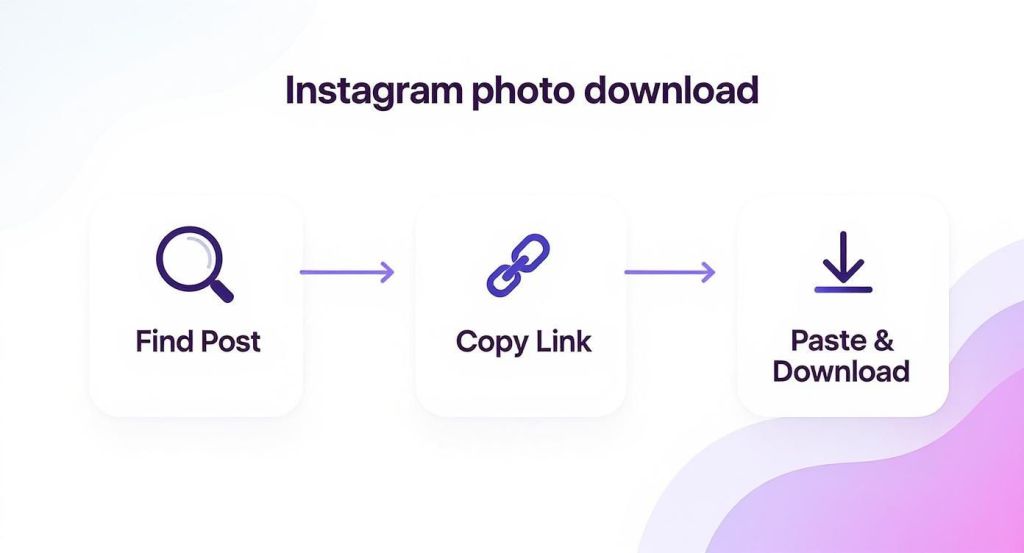
As you can see, it’s a pretty straightforward 3-step process: find the image, copy the link, and paste it into the downloader. It’s the core mechanic behind most of these services.
Weighing Your Choices
For the more technically inclined, there’s always the option of digging into the page’s source code. This method involves inspecting the website’s HTML to find the direct URL of the image file. It’s a powerful trick, but honestly, it’s not the most practical or user-friendly route for most people.
To help you decide, think about what matters most to you:
- Ease of Use: How simple is the process from start to finish? Web tools almost always win here.
- Speed: For a one-off download, a web tool is fastest. But for saving photos regularly, an extension is hard to beat.
- Quality: Forget screenshots. Most dedicated download tools will grab the image in its highest available resolution.
- Security: This one is non-negotiable. Never use a tool that asks for your Instagram login. A trustworthy service only needs the public URL of the post.
The best method is the one that feels efficient and safe for you. Your choice should match how you use Instagram and what you need the photos for.
Comparison of Instagram Photo Download Methods
Here’s a quick look at the pros and cons of different ways to download photos from Instagram, helping you choose the best option for your needs.
| Method | Ease of Use | Best For | Potential Risks |
|---|---|---|---|
| Web-Based Tools | Very Easy | Quick, one-off downloads on any device. | Some sites have intrusive ads or pop-ups. |
| Browser Extensions | Easy | Frequent, seamless downloading. | A poorly-coded extension could be a security risk. |
| View Page Source | Difficult | Tech-savvy users who want direct file access. | Time-consuming and requires technical knowledge. |
| Screenshotting | Very Easy | Capturing a quick, low-quality reference. | Low resolution, includes UI elements, poor for print. |
Ultimately, taking a moment to choose the right tool makes the whole process smoother and keeps your device secure.
Making an informed decision helps you get the content you need without wasting time or compromising your account. For a deeper dive, check out our detailed comparison of the best downloader for Instagram to see which tools we rate the highest.
Keeping Your Downloads Crystal Clear

Getting the photo off Instagram is one thing, but making sure it looks just as good on your device is the real challenge. Instagram already compresses images before they hit your feed, so you’re already fighting a small battle for quality.
The biggest mistake I see people make is just taking a screenshot. It’s fast, sure, but it’s a surefire way to end up with a blurry, pixelated mess. Screenshots capture all the screen elements and tank the resolution, making the image useless for much more than a quick glance.
Pick the Right Tool for the Job
If you want the best possible version of an instagram download photo, you need a tool that pulls the original source file. A good downloader works by grabbing the image as it was first uploaded, completely sidestepping the quality loss you get from a screenshot.
Most dedicated downloaders will give you a choice of resolutions. It’s a no-brainer: always pick the highest quality option. This simple click makes a world of difference, especially if you plan on printing the photo or using it for a project where clarity is key.
Your goal should be to save an image that looks just as crisp and detailed as it did in the app. Ditching screenshots for a direct download is the single most important step to get there.
It’s no surprise people want to save their favorite content. The Instagram app was downloaded a staggering 696 million times in 2023 alone, showing just how much users want to do more than just scroll.
What to Do After You Download
Once the file is on your device, give it a quick once-over. Zoom in and check for any unexpected blurriness or pixelation. Sometimes, even a direct download might not be as sharp as you’d like.
If the downloaded quality isn’t quite up to snuff for what you need, don’t worry. There are ways you can improve image resolution with specialized software.
For a deeper dive into this, check out our guide on getting an Instagram downloader high quality result every single time.
Navigating Copyright and Privacy Responsibly
It’s incredibly easy to download a photo from Instagram, but just because you can doesn’t always mean you should. The real responsibility starts after you save the image, and it all comes down to one thing: how you plan to use it.
Saving a photo for your own private collection, maybe as a phone wallpaper or for a personal mood board, is usually fine. The line gets crossed the moment you decide to republish that image anywhere else. That’s when you wander into copyright territory.
Understanding Creator Rights
Here’s the simple truth: every single photo on Instagram belongs to the person who created it. It’s their intellectual property.
If you didn’t take the photo, you don’t own it. Period. Reposting someone’s work without getting their explicit permission isn’t just bad etiquette; it’s a violation of their copyright. This isn’t just about being a decent person online, it’s a legal boundary.
The core principle is simple: always prioritize the creator’s rights. Your ability to download a photo does not automatically grant you the right to reuse it however you wish.
How to Give Proper Credit
So, what if you’ve done the right thing and received permission to share someone’s photo? Great! But your job isn’t done. Giving proper credit is non-negotiable, and a vague mention just won’t cut it.
Here’s how to do it right:
- Tag Them in the Photo: The first step is to tag the creator’s username directly in the image itself.
- Mention Them in the Caption: Don’t bury the credit. Mention their handle right at the top of your caption so it’s the first thing people see.
- Don’t Alter Their Work: Never, ever edit or add filters to someone else’s photo without their direct approval.
Following these guidelines ensures you’re sharing content ethically and respectfully. If you want to dig deeper into this topic, our post on social media privacy settings has a lot more useful insights.
Got Questions About Downloading Instagram Photos?
Diving into the world of Instagram photo downloaders can feel a bit like the wild west. You’re probably wondering what’s okay, what’s not, and how to keep your devices and data safe. Let’s clear up some of the most common questions people have.
Is It Even Legal?
This is the big one, and the answer is all about intent. If you’re saving a photo to use as your phone wallpaper or to add to a personal mood board, you’re generally in the clear. The trouble starts when you repurpose someone else’s content for your own gain, like using it in your own marketing or reposting it without giving credit. That’s a surefire way to step on copyright laws.
Are These Downloader Tools Safe to Use?
It’s smart to be cautious. A trustworthy downloader will be web-based and will never ask for your Instagram password or login information. Think about it: all it needs is the public URL of the photo you want to grab.
If a site or app asks you to:
- Enter your Instagram credentials
- Install suspicious software
- Provide any personal details
…run the other way. Stick to tools that only require the link.
What About Photos From Private Accounts?
That’s a hard no. Any legitimate public downloader is built to respect user privacy, which means they can’t access or save content from a private profile. Trying to find a workaround is a major breach of that person’s privacy and a violation of Instagram’s rules. If you’re already following the private account, you could take a screenshot for your own personal use, but never, ever share it publicly.
Here’s a key thing to remember: Instagram doesn’t tell users when someone downloads their photo using a third-party tool. The same goes for screenshots of regular feed posts. Your activity stays private.
The only time Instagram sends a notification is if you screenshot a disappearing photo or video within a direct message. It’s a small but important distinction that helps you know what’s visible to others and what isn’t.
Ready to save Instagram content the easy and secure way? IG Media gives you a free, fast, and anonymous tool for downloading photos, videos, and Reels. Give it a try at https://www.ig.media today.